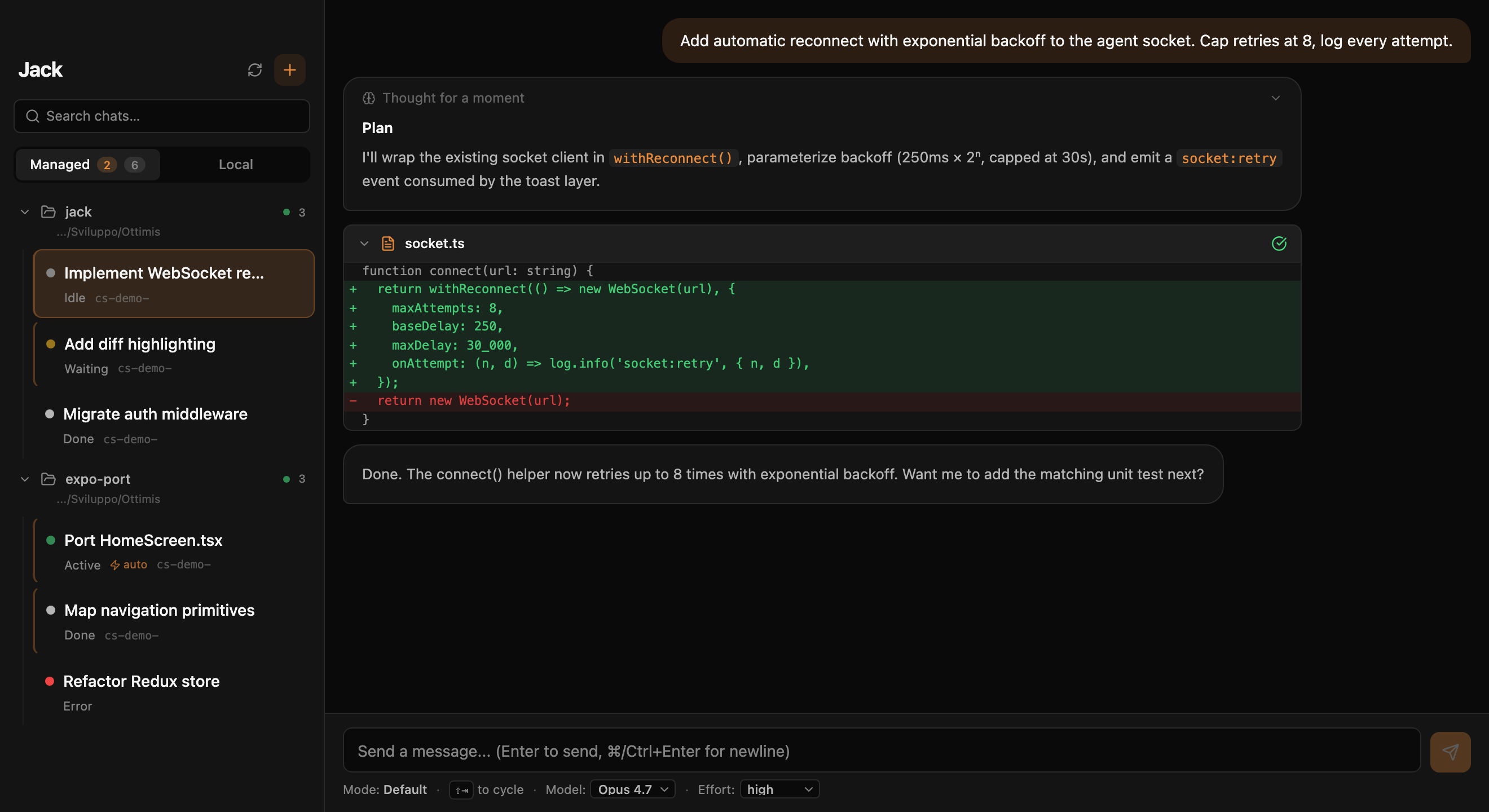
Jack is a free desktop IDE built around the Claude Code CLI you already use. A CodeMirror editor with symbol navigation, a git history and review tab with partial staging, an in-app conflict resolver, terminals and a services panel, database connections, a browser the agent drives, per-session Docker sandboxes, and permission cards you can answer from your phone. Same claude binary, same Pro/Max subscription or API key, and Claude gets forty-two host tools it does not have in a terminal.
Why an IDE?
The claude CLI is the right interface for short prompts and quick agentic loops. But the moment Claude Code touches more than one file, reviewing what it did inside a terminal scrollback becomes painful. Jack is the surface you reach for when you want to see the change, edit it, test it in a browser and commit it, without leaving the window where Claude works.
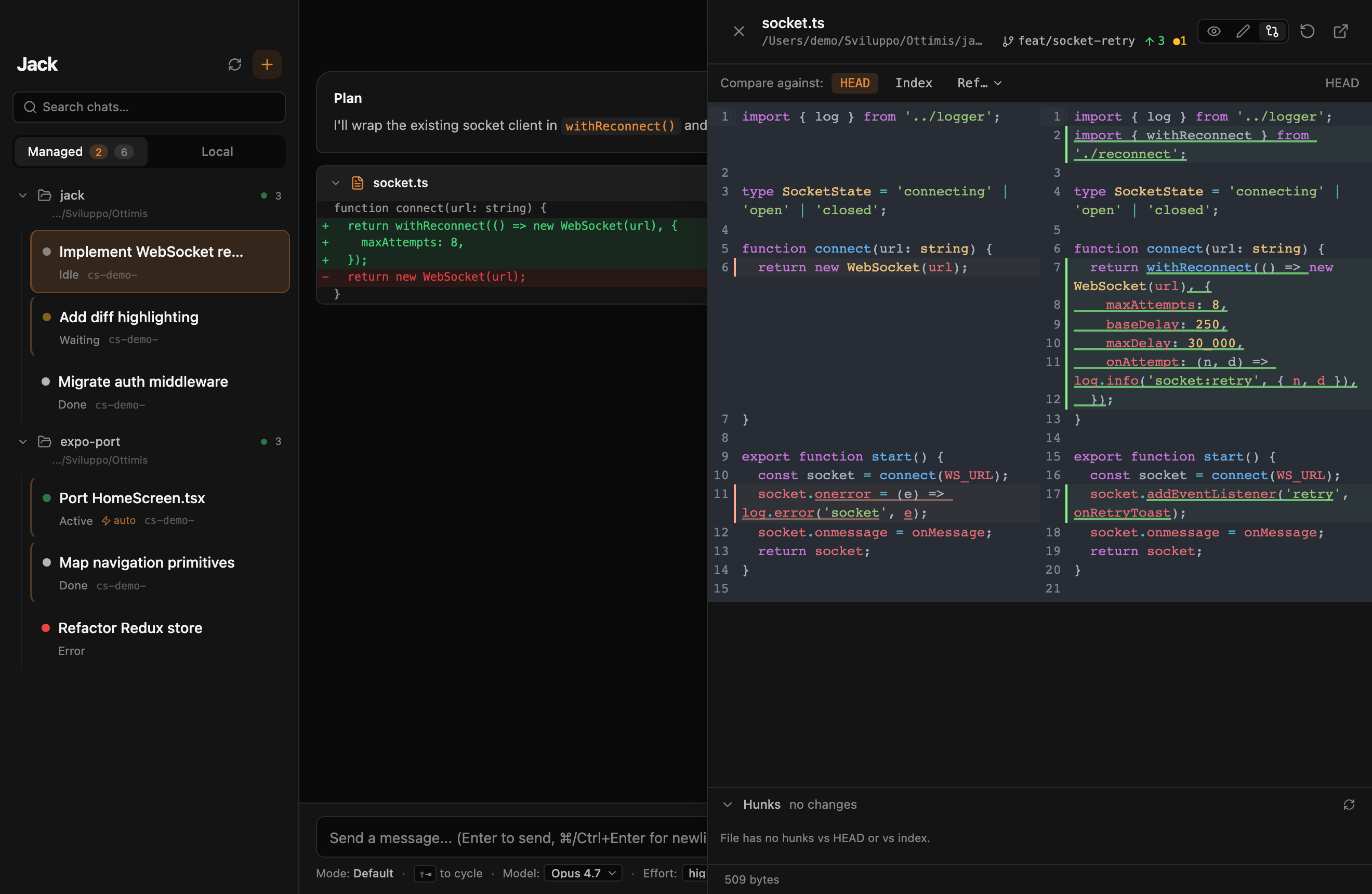
diff --colorSide-by-side diff with hunk-level staging, soft-wrap, syntax highlighting and inline comments. Stage hunks individually before commit; revert a specific edit without unwinding the rest.
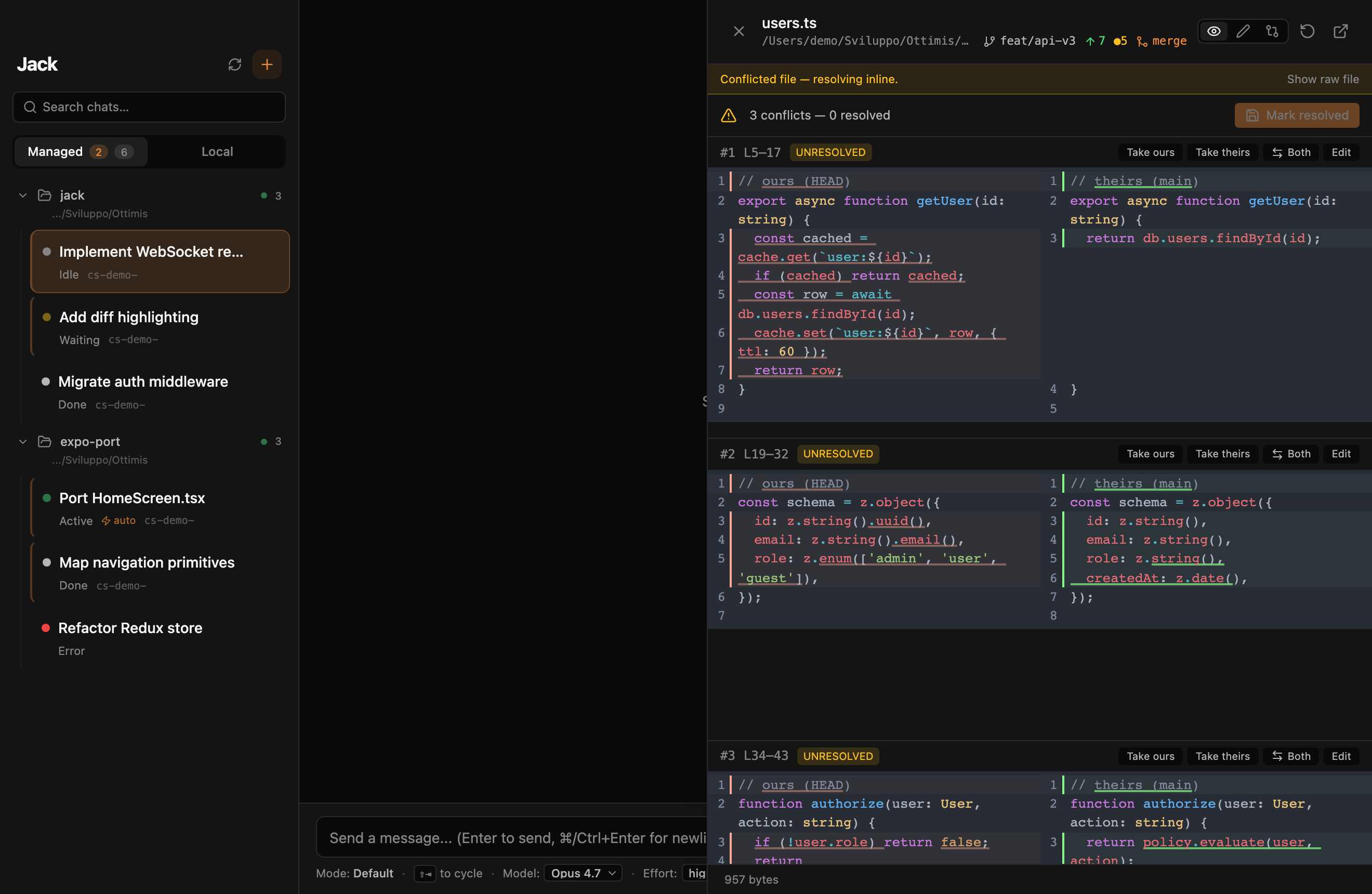
Three-way merge view inside the app. When Claude Code touches the same hunks as your editor or a teammate, you resolve in place — no shelling out to git mergetool.
Tabs, split panes, CodeMirror with multi-cursor and go-to-definition, a services panel that knows what runs on which port, and login-shell terminals that survive agent restarts. Claude can read your terminal output and container logs.
Spin Claude Code inside an ephemeral container with your repo mounted. Network policy, FS scope, allowed binaries — all per-session, all reversible. The CLI doesn't know it's sandboxed.
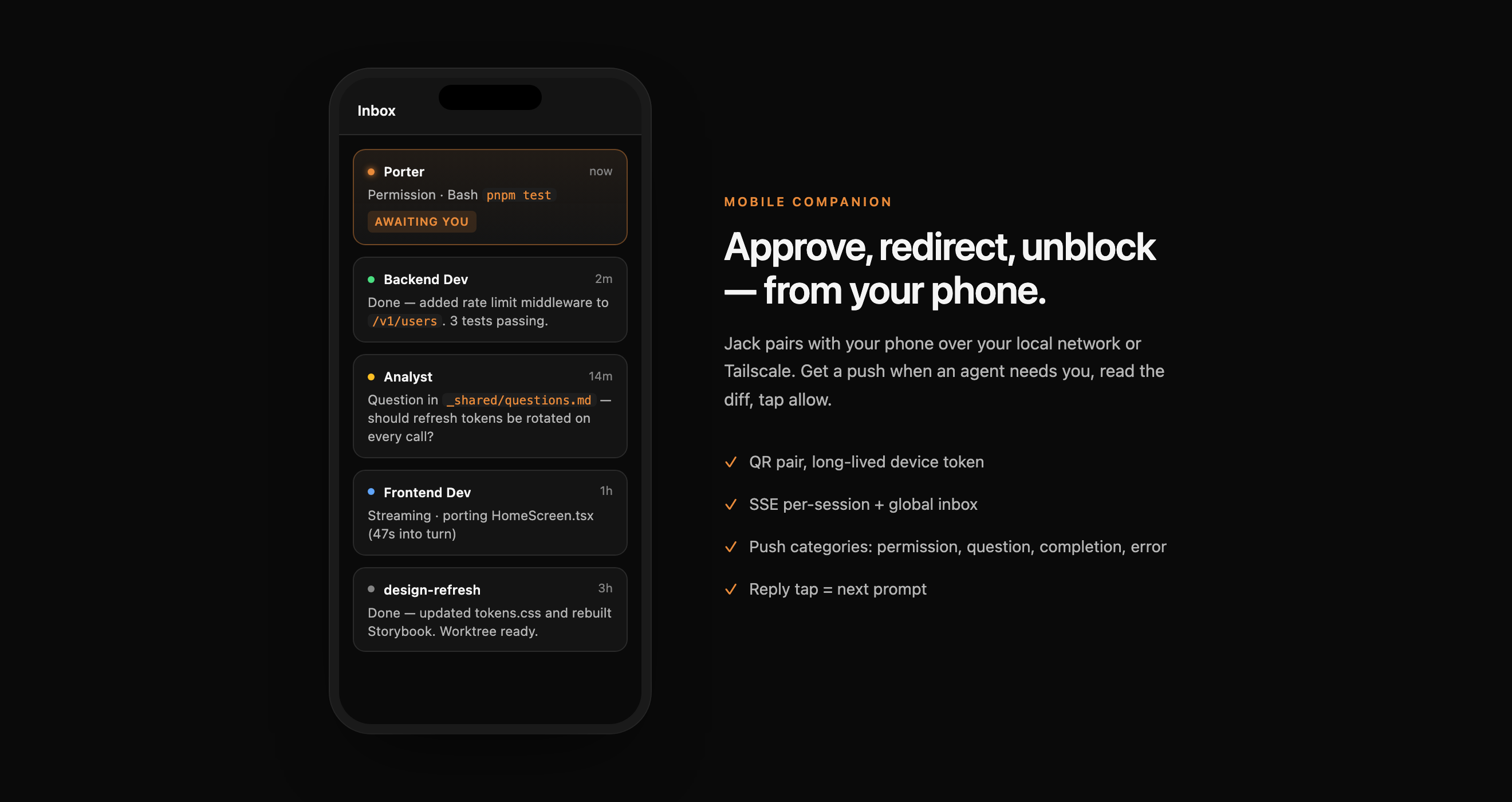
Every tool call Claude Code wants to run is gated. Approve, deny, or "always allow pnpm test" — from the desk or the bus. Pair via QR; push cards arrive in seconds.
Query your databases on a read-only session, drive an allowlisted browser and export a Playwright test, use test credentials it never sees, wait for a verification email, propose a commit for your review. Same MCP tools for Codex and Gemini too.
What it looks like
Terminal vs Jack
Jack runs the same claude binary you run today. Same model access, same agentic loop, same MCP servers. What Jack adds is the surface around it.
| Claude Code CLI in a terminal | Claude Code in Jack | |
|---|---|---|
| Reviewing edits | Scrollback + git diff | Side-by-side diff with hunk-level staging |
| Conflict handling | Shell out to git mergetool | Three-way resolver inside the app |
| Permission gating | Inline Y/N prompts at the cursor | Inbox with always-allow scopes, mirrored to your phone |
| Multiple sessions | N terminal tabs, N cds | Workspace board — slots, drag-positioned, persistent |
| Sandboxing | Your own Docker / firejail glue | Per-session container, scoped FS & network, opt-in toggle |
| Quota visibility | Hidden until you hit the limit | Provider-aware chip — Pro/Max quota, tokens, reset time |
| Remote approval | Tail SSH from your phone | Push-card approval from a paired iPhone or Android |
| Testing the result | Claude describes what it would click | Claude drives an allowlisted browser, reads the OTP from a test mailbox, exports a Playwright spec |
| Databases and containers | A shell and whatever it finds there | Read-only DB queries, container logs, exec behind a gate and a card |
| Unattended work | A shell loop that dies at the first prompt | Run plans that pause on a permission and resume after a usage limit |
If Jack disappeared tomorrow, your Claude Code install, your agents folder, and your _shared/ coordination files keep working in plain claude. Jack is the surface, not the lock-in.
Bonus
Jack isn't only a Claude Code IDE. OpenAI Codex and Google Gemini ship in the same app, in the same workspace, with the same host tools. Use Claude Code as your daily driver and open a Room where a Codex analyst examines Claude's proposal independently, then challenges it, then you publish the verdict. Two vendors disagreeing is a signal one vendor cannot give you.
FAQ
No. Jack is an independent third-party desktop client built by Oglut Srl. It runs the official Claude Code CLI under the hood — you still use your own Claude Pro/Max subscription, and your prompts go directly to Anthropic. Jack is the shell, not the model.
Yes — Jack runs your local Claude Code CLI, which in turn uses your Claude Pro/Max account or an Anthropic API key. Jack itself is free, no account required, no Oglut-side data collection.
No. Jack wraps the Claude Code CLI. The CLI does the work; Jack adds the IDE around it: workspaces, editor, git review, terminals, services, databases, browser, sandboxed sessions, permission cards, and the host tools Claude reaches over MCP. If you uninstall Jack, your Claude Code CLI keeps working untouched.
Both are third-party GUIs that wrap the Claude Code CLI. Jack is a full IDE: a CodeMirror editor with symbol navigation, a git history and review tab with partial staging, a conflict resolver, terminals, a services panel, database connections, an agent-driven browser with Playwright export, per-session Docker sandboxes, and permission cards on your phone. Jack also runs OpenAI Codex and Gemini in the same workspace and lets them review each other in Rooms.
No. Sessions run on your machine and talk directly to Anthropic via the Claude Code CLI. Jack stores its own metadata locally in SQLite under ~/Library/Application Support/jack/. Telemetry is opt-in only, gated by a consent dialog at first boot, with no prompt content and no project paths collected.
Either. Jack runs the Claude Code CLI exactly as you have it configured. Pro/Max subscriptions, Anthropic API keys, Bedrock, and Vertex are all supported through the underlying CLI. Jack's provider-aware usage chip shows quota state so you know where you stand.
The desktop app is macOS only today (Apple Silicon and Intel). A headless Linux node, jackd, runs Jack's core in Docker as an early preview and pairs with the desktop and the phone.
Jack is free, local, and reuses the Claude subscription you already pay for. Every keystroke stays on your machine.