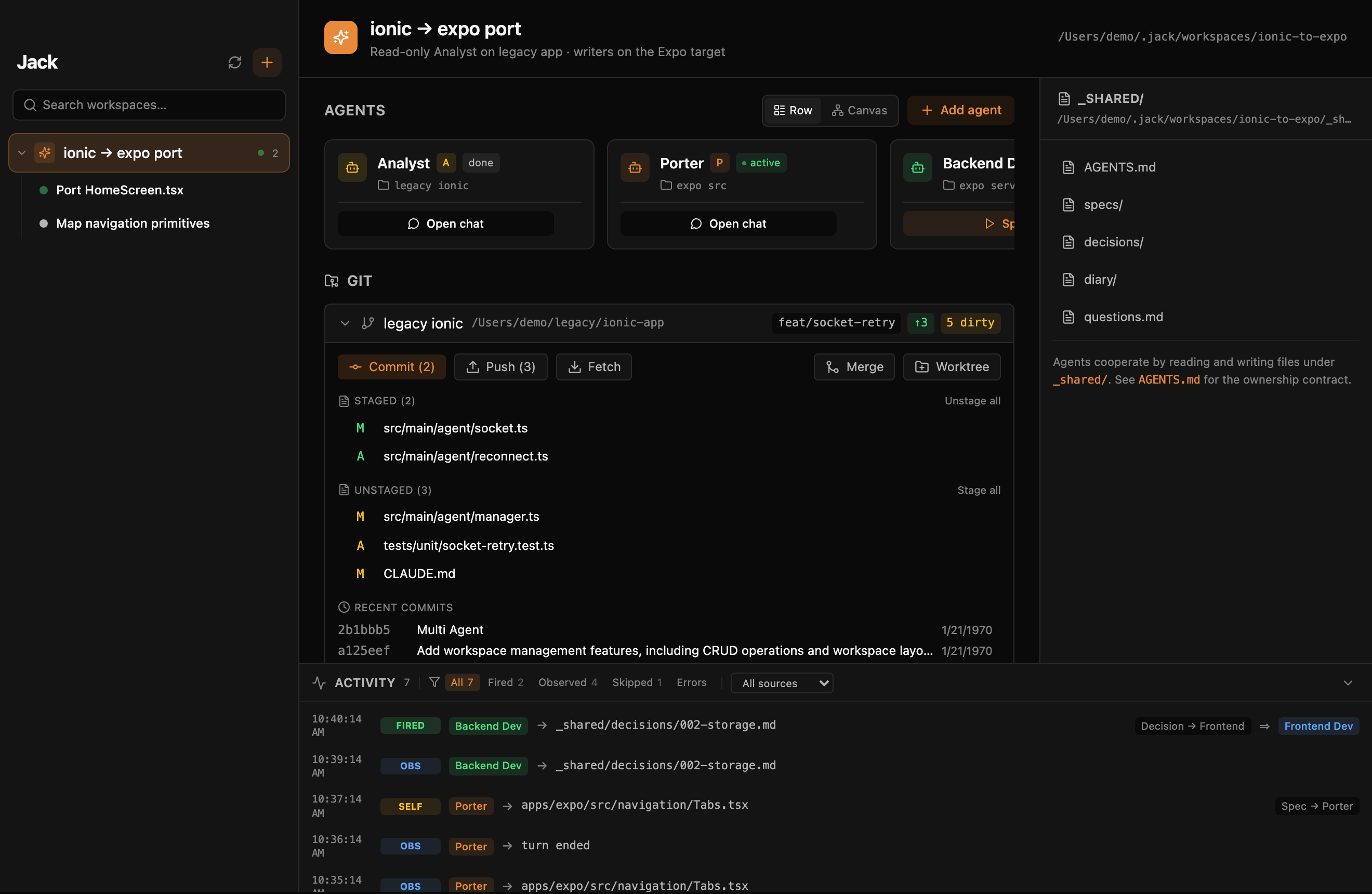
Jack is a free macOS IDE built around coding agents instead of a text cursor. Claude Code, OpenAI Codex and Google Gemini share the same workspaces, editor, git, terminals, services, databases and browser. Agents from different vendors review each other in Rooms, plans run unattended through the night, and every tool call still passes through you, from the desk, the floating HUD, or your phone.
Jack grew up
A chat window is where you talk to an agent. An IDE is where the agent actually builds, tests, commits and gets reviewed. Jack is the second thing: the code, the tools and the supervision live in one window, and the agent is a first-class user of all three.
01 · Code
Tabs, split panes, a CodeMirror editor, a git history and review tab, terminals. Everything the agent touches, you can open, read and edit without leaving Jack.
02 · Agents
Claude Code, OpenAI Codex and Google Gemini get the same host tools over MCP: databases, containers, terminals, services, browser, vault, mailbox, git proposals, todos.
03 · Control
Every write goes through a permission card. Dangerous tool families are off by default. A floating HUD and a multi-workspace cockpit tell you where you are needed, and your phone tells you when you are away.
What's inside
Twelve surfaces, one app. Each one is available to you and, where it makes sense, to the agent through a host tool.
A workspace is folders plus agent slots plus shared docs. Tabs of seven kinds, two-pane split, preview tabs, one window per workspace, drag a folder from Finder to start one.
CodeMirror 6 with multi-cursor, column selection, folding, completion, a sticky scope header, YAML and compose lint. ⌘click to a definition, ⇧⌘O to any symbol.
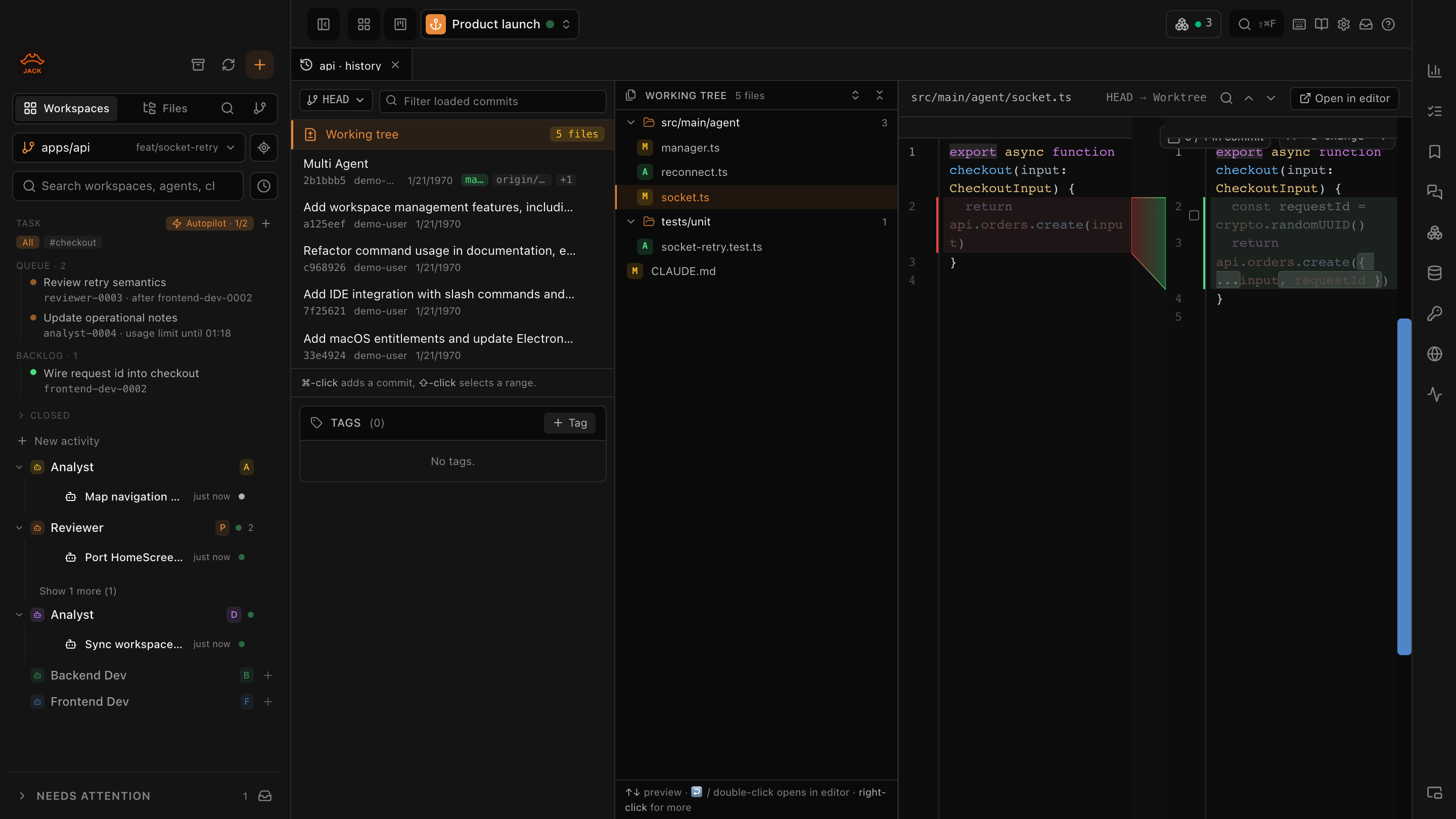
Commits, files, inline diff in three columns. Review twenty files with ↑ ↓ ]. Partial staging from the diff, conflict resolver, smart checkout, tags, version bump, AI commit messages.
A multi-tab terminal dock owned by the agent slot, so it survives sessions. A Services panel that discovers npm, composer, Python, Makefile, Procfile and compose targets, with ports, exit codes and output after death.
See your project's compose containers, tail logs, open a shell, start or recreate. Agents read logs by default and exec only behind a gate. Run the agent itself in a sandbox container, per session.
Named MySQL, PostgreSQL, SQL Server and SQLite connections per workspace. Agents query on a genuinely read-only session, writes show the SQL on a card, every call is logged.
An allowlisted Chromium window the agent drives while you watch the cursor move. Isolated profile, console and network errors as tools, and the whole run exported as a Playwright spec. More →
Test cards and staging logins the agent uses but never sees. Disposable email addresses with the verification code extracted, so signup and checkout flows run end to end.
Claude and Codex deliberate on the same brief, independently first, then challenging each other. Publish a verdict, export it as a report or an ADR. More →
Queue steps for several agents, run them unattended in parallel lanes, pause on a permission, park on a usage limit and resume at the reset. Agents can arm their own next wake-up, with a budget. More →
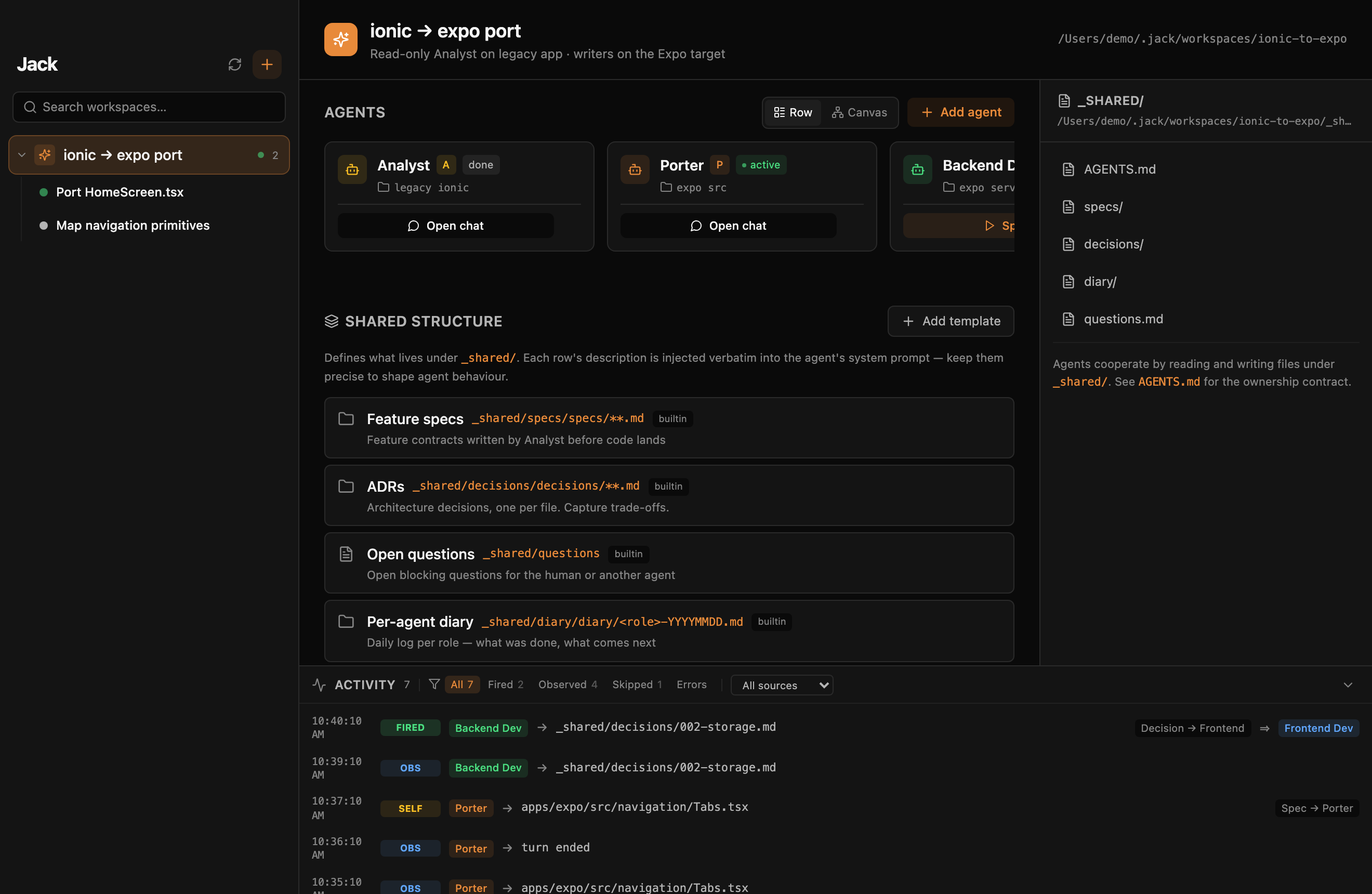
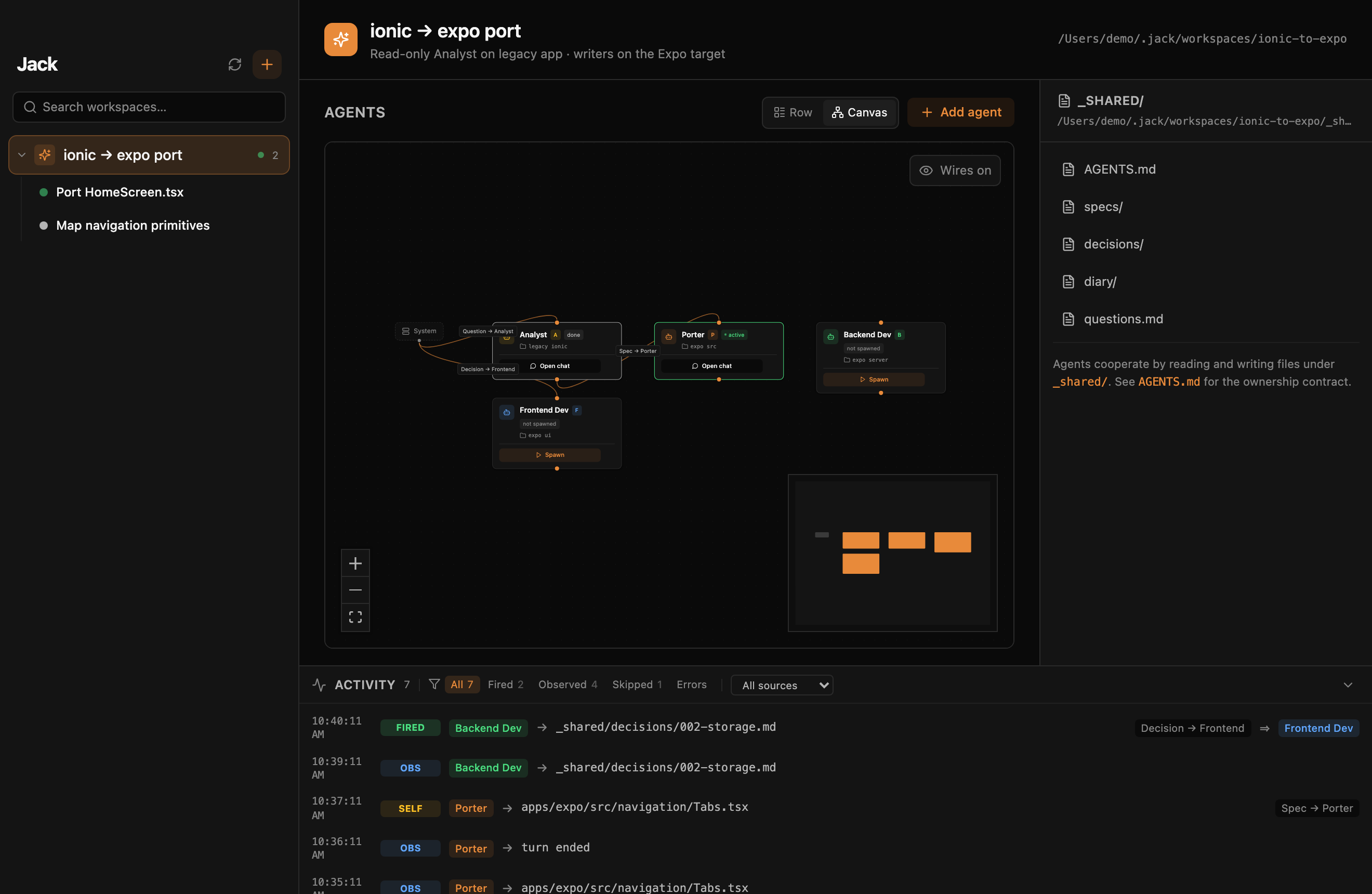
Agents cooperate through _shared/ and AGENTS.md. Activities bundle a planner with clean implementation sessions. A host-committed git log turns the history into a zoomable timeline with what is waiting on you.
A floating always-on-top HUD with inline Allow and Deny. A cockpit across every workspace with blocking signals pinned on top. Jack Mobile streams the chat and the permission cards to your pocket.
The workbench
Every "open this file" lands in a Jack tab. The editor is CodeMirror 6 with the shortcuts you already have in muscle memory, and the git surface is built for reviewing what an agent just did, not for clicking a commit button.
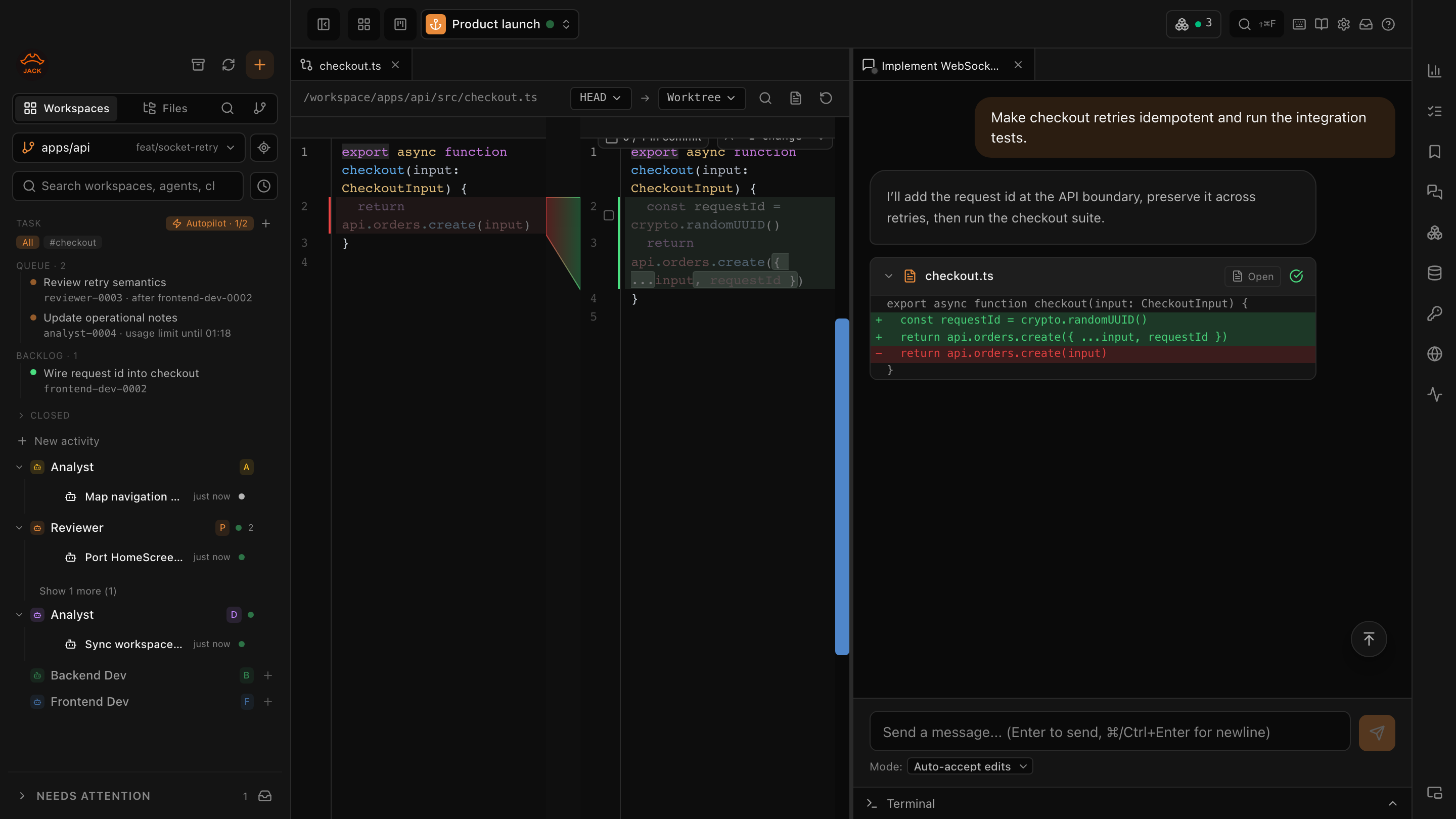
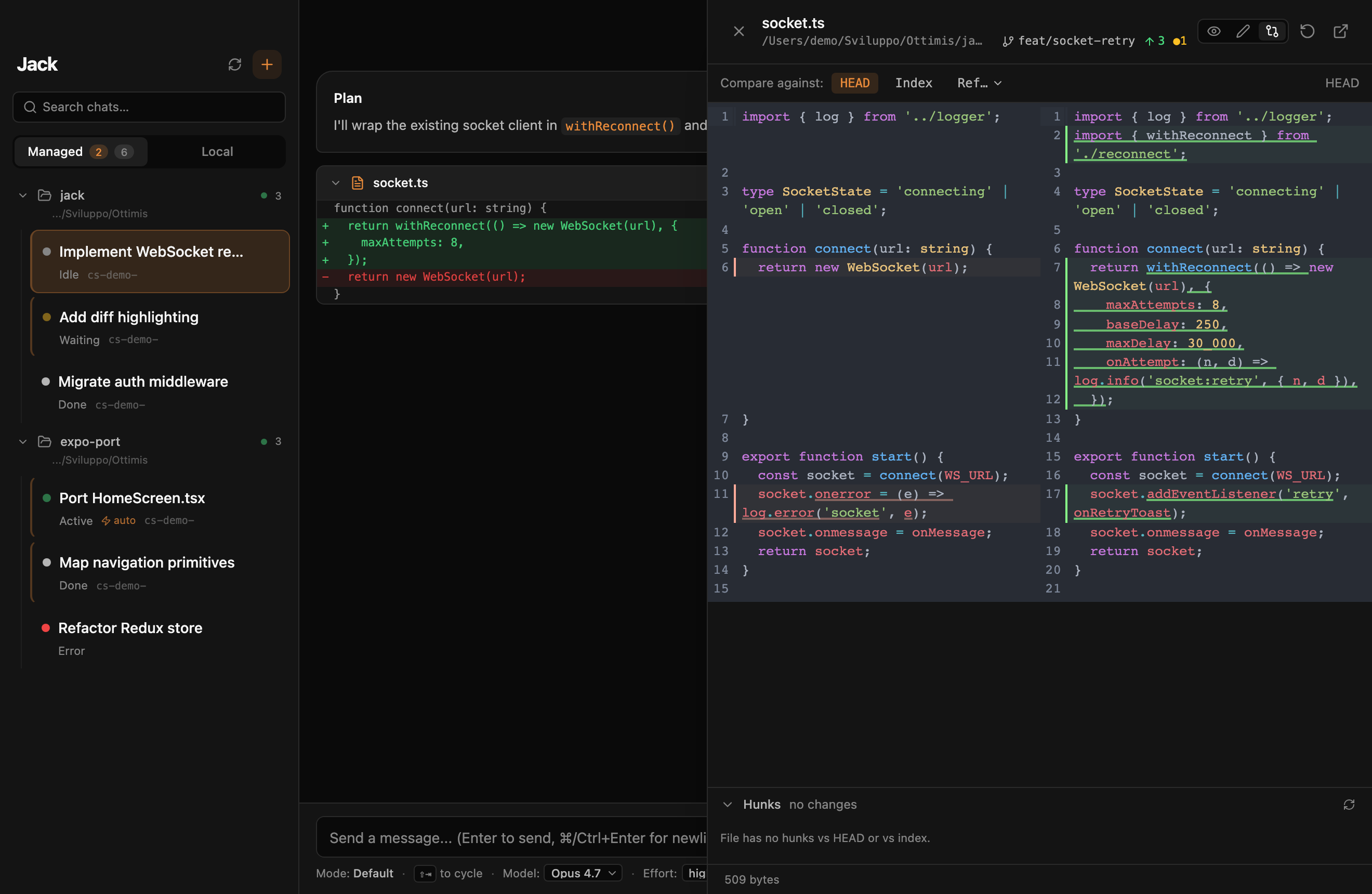
Compare the working tree to HEAD, the index, or any ref. Tick chunks or selected lines straight from the diff; the state is read back from the index by content, so what you see staged is what will be committed.
Commits on the left, files in the middle, the inline diff on the right, with a fixed "Working tree" row on top. ↑ and ↓ move through files, ↩ promotes to a full diff tab, ] and [ step through files from anywhere in the tab.
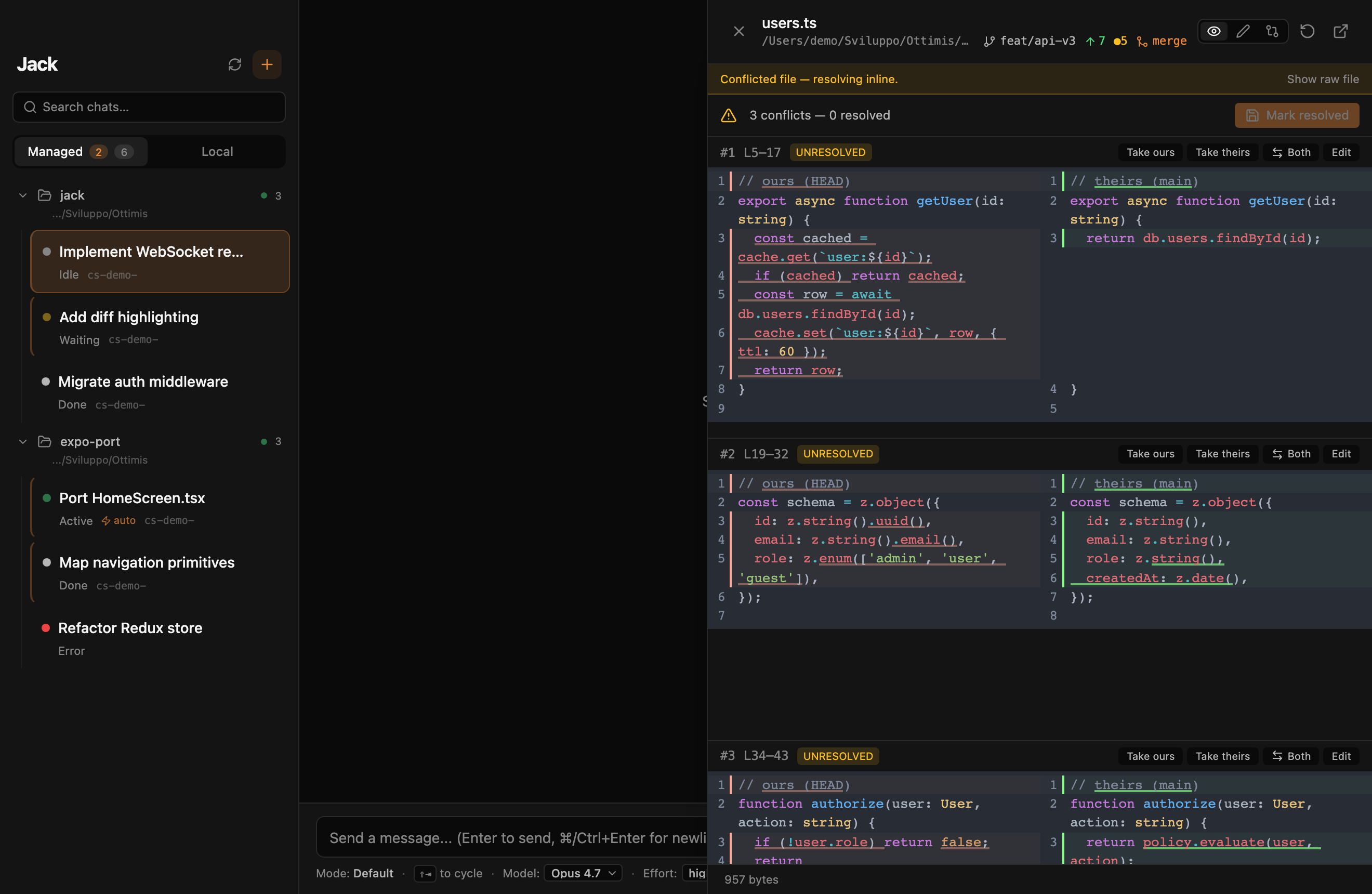
A per-chunk conflict resolver with ours, theirs, both or hand edit. Smart checkout that offers stash, switch and pop on a dirty tree. Worktrees you can create from the fork dialog and assign to an agent slot.
--force-with-lease only.Honest scope. Symbol navigation is name-based, not type-aware: homonyms open a picker. There is no LSP yet, and no autosave.
Agents & providers
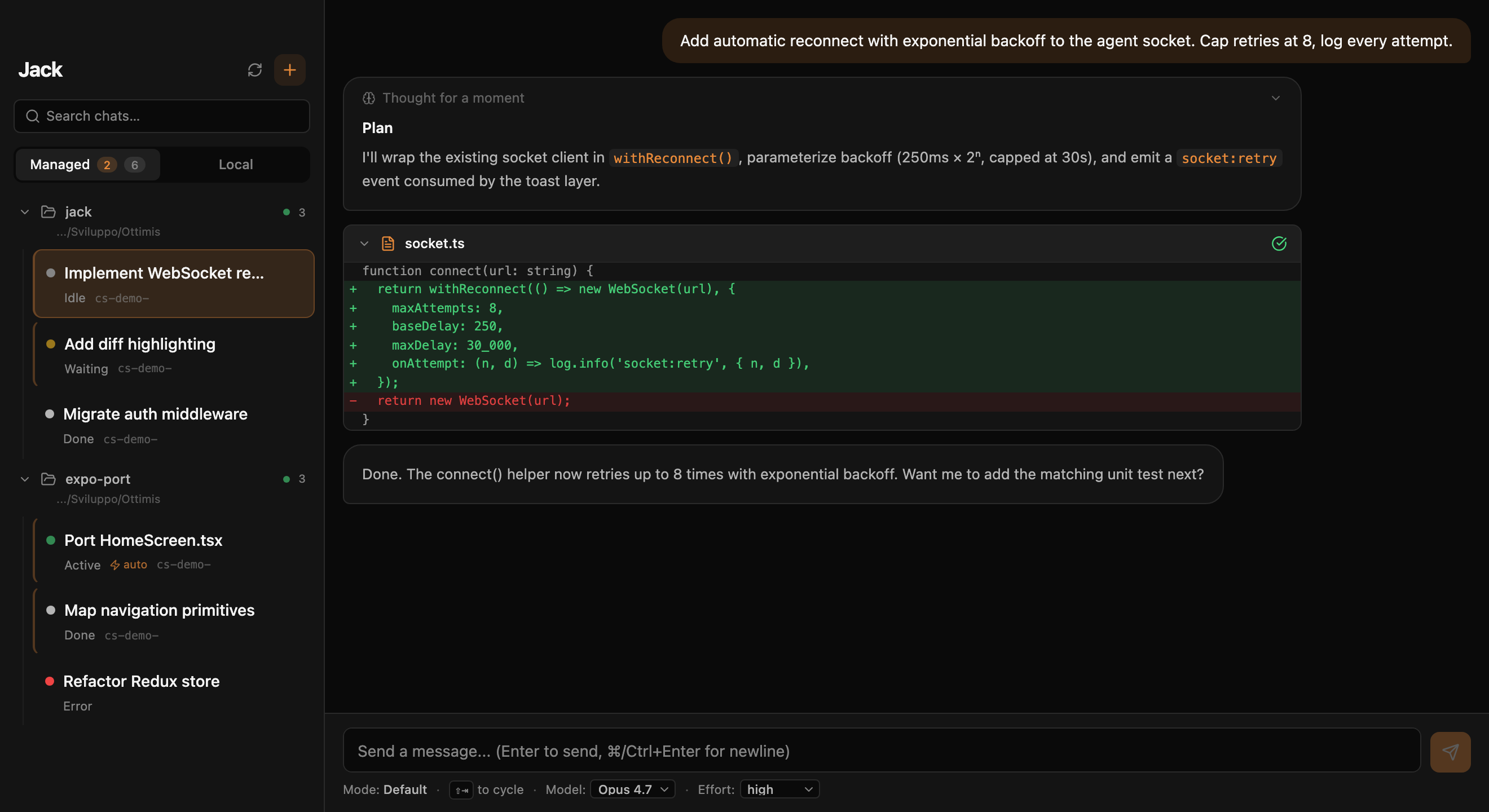
The provider is a per-session choice. The same backend-dev slot can host a Claude session implementing a feature and a Codex session reviewing it. Every provider goes through the same permission cards, the same host tools and the same chat renderer, because nothing outside the provider package knows which vendor it is talking to.
codex app-server, interactive threads resumed on config change.@ottimis/jack-gemini, the reference third-party provider.request_permission with allow-once and allow-always. Modes: default, accept edits, plan, bypass. No effort levels in ACP.Chat is the structured experience: cards, live switches, host tools. Terminal runs the real interactive CLI inside Jack, with live tool cards and per-turn snapshots on top. Switch a session between them in place.
When a turn is served by a different model than the one you chose, the message carries a badge. When a provider CLI regresses a capability, the chip goes amber instead of failing quietly. Diagnostics are advisory, never blocking.
Agent definitions are plain agent.md files with standard frontmatter: frontend-dev, backend-dev, analyst, porter ship in the box. Drop yours in ~/.jack/agents/. They work outside Jack too.
Third-party providers are npm packages under ~/.jack/plugins/, manifest-validated and semver-checked against the SDK. They start pending until you trust them, and a version bump asks again.
@ottimis/jack-provider-sdk 0.30 and @ottimis/jack-chat-core are MIT on npm. Implement JackProvider, declare a capability matrix, plug in. Gemini is built on exactly this contract, so it is proven end to end. The Jack runtime is closed; the contracts that let third parties in are not.
Where the three differ today. The Docker sandbox and multi-account profiles are Claude-only. One-shot helpers such as AI commit messages and bookmark distillation need Claude installed and soft-degrade otherwise. Codex sessions do not receive the host tools in every path yet.
Host tools
Jack serves its own MCP server to every session, whatever the vendor. Reads are on by default. Writes that matter show a card with the real arguments every time. Tool families that can hurt are off until you switch them on in Settings → Privacy. Unknown tool names fail closed.
Named connections per workspace. Queries run on a read-only DB session, results capped and the cut declared. Writes show the SQL on a card.
List, logs and inspect with env values masked. One-shot exec, restart, start and recreate each sit behind their own default-off toggle plus a card.
The agent can read the tail of your dev terminals and see which services run on which port. It cannot start or stop a service; that stays a human move.
Accessibility snapshot, screenshot, console and network errors. Navigate, click, type, select and wait once you allow driving. Export the run as a Playwright spec.
Fixtures come with their value, secrets never do: the agent types vault:entry.field and the host fills it. Mint a disposable address and wait for the code.
The agent proposes a commit with an explicit file list or a merge. You see per-file diffs, an editable message, predicted conflicts. Jack commits exactly what you approve.
An agent can ask for a second opinion from another vendor; only you can open the room. Inside, it reads and posts on its own schedule.
A shared checklist that belongs to you, and schemaless data tables the agent fills from conversations and recalls later with /recap and /recall.
Reserve the next task or ADR number so two agents never collide, open a handoff task for another agent, arm a single self wake-up under a budget.
How the gate works. Every tool carries two independent labels: effect (read or write) and approval (auto or human). Auto-allow is an inclusion list, so a tool Jack has never heard of needs a card by construction. On Codex, MCP approvals go through the same cards instead of failing silently.
Rooms
Two instances of the same model make correlated mistakes. Two different models do not. A Room is a persistent conversation between agents on different vendors, brokered by Jack, where they examine a brief independently first and challenge each other second. No vendor will ever ship the pipe that puts a Codex reviewer in front of a Claude proposal. Jack does.
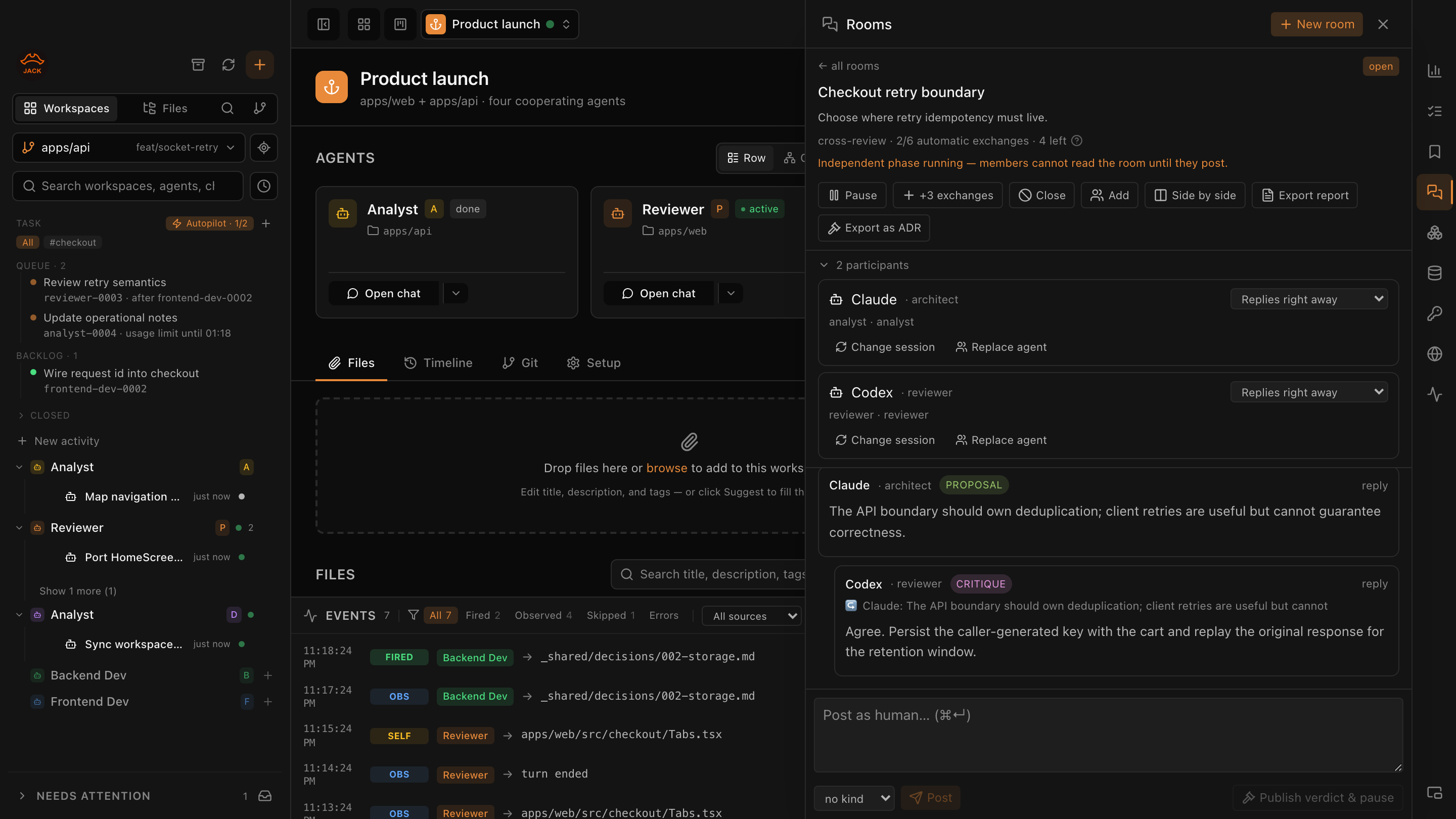
Second opinion, Challenge my answer, Security check, Cross review, or custom. Participants are slot × provider, bound to an existing session or a fresh one with no context. The dialog shows the exact kickoff each participant receives before you press Start.
_shared/reports/ or as a numbered ADR.Deep dive: how agents from different vendors review each other →
Scope today. Rooms are verified on Claude and Codex; Gemini follows after a parity check. Rooms stay inside one workspace and on the local node. Only you can open, start, pause or close a room; an agent can only ask.
Unattended work
A run plan is a named queue of steps, each targeting an agent slot with a prompt or a task file. Jack's runner executes it without you: steps for different agents run in parallel, a permission prompt pauses the plan and pings you, and a provider usage limit parks the plan and resumes it exactly when the window resets, across app restarts and sleep.
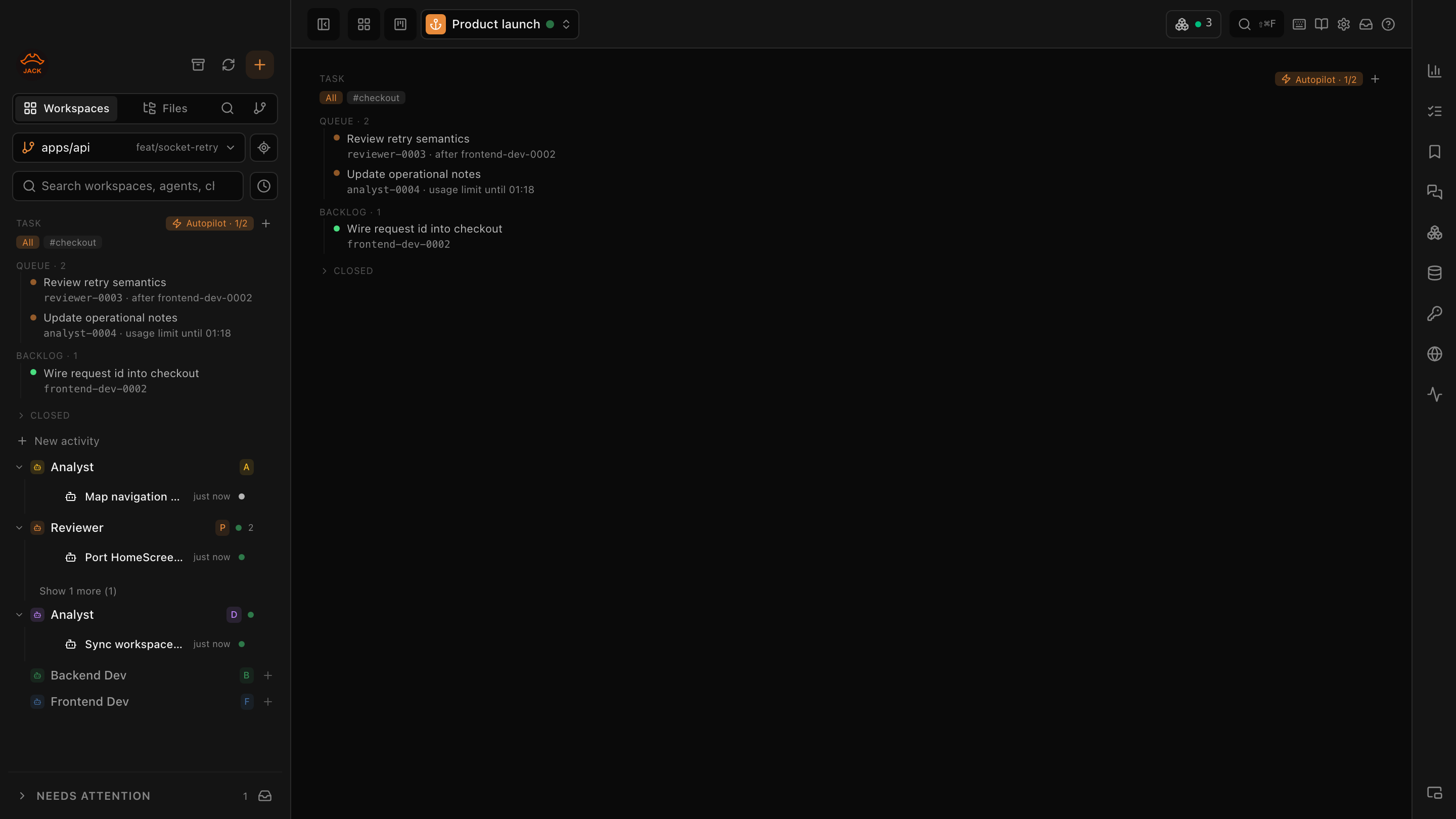
An agent slot is one session, so its own steps never overlap. Different agents run at once. When you need a real dependency, tick wait for all and nothing after the barrier overtakes it. Failure policy is stop or continue, and stop never kills a turn in flight.
Deep dive: how run plans survive permissions and usage limits →
Turn on Allow self-scheduling for a slot and the agent can say "wake me in 15 minutes to re-check open tasks". One pending wake-up per slot, a five-minute floor, and after five idle re-arms Jack force-stops the loop and records why. No silent token drain.
Discuss with a planner agent, it writes tasks into _shared/tasks/, and a ▶ card appears. Pressing it is the human-in-the-loop: the target agent spawns with a clean context seeded by the plan, continuing its existing session or starting fresh.
A spec lands, the reviewer is prompted with it as context. A task flips to done, whoever opened it gets pinged. Path pattern, optional regex, action. Off by default, every fire and skip logged. More →
Jack commits _shared/ in its own git repo with actor attribution, then renders the history as a zoomable canvas: milestones, work spans, open items that get louder with age, and a "Waiting on you" strip where you answer a question and wake the asker.
Run & test
Building is half the job. Jack gives agents the rest of the loop: a services panel that knows what is running on which port, a browser they drive while you see the cursor move, test credentials they use but never read, and a mailbox that hands back the verification code. When it works, the run becomes a Playwright spec any CI can replay.
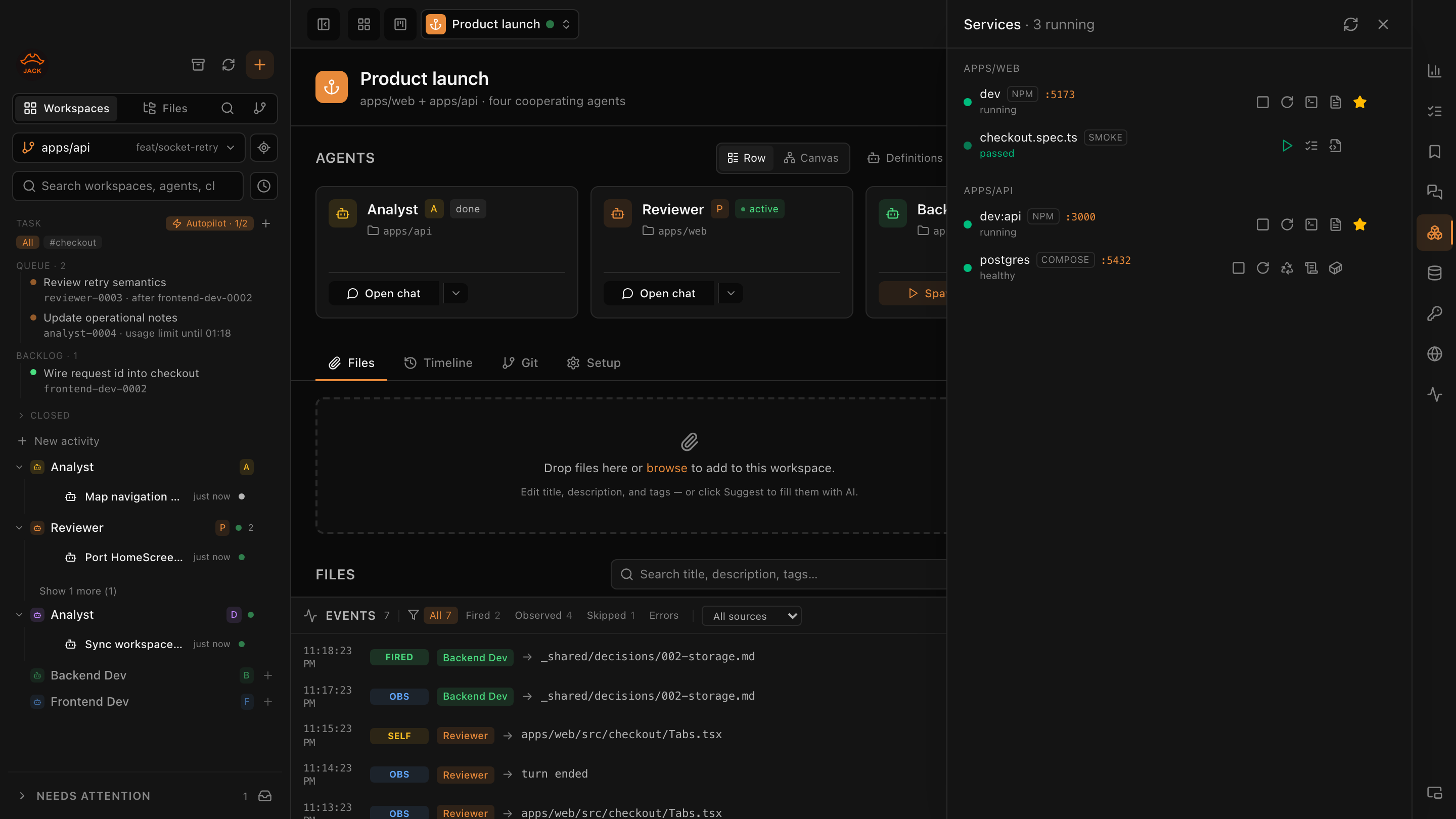
The backend agent starts npm run dev; the frontend agent sees it and does not start a second one. You see all of it from any session, with the last output still readable after a process died. Scripts come from npm, composer, Python (uv, poetry, pipenv, venv detected), Makefile and Procfile; compose services appear even before a container exists.
Localhost and friends by default; any other host shows an interstitial with a one-click Allow. Isolated cookies per workspace, so the agent never touches your real profile. Docked to Jack's edge, undockable, never steals your caret.
The recorded actions become a plain @playwright/test file under tests/smoke/. It runs with npx playwright test on a machine that has never seen Jack. Secrets become process.env reads, never literals.
Fields marked fixture are visible, like a Stripe test card. Fields marked secret never enter the model's context: the agent types a handle, the host fills it in the browser and redacts it from every snapshot and console line.
The agent mints a disposable address, hands it to the app under test, then waits. Jack returns the first matching message with the codes and links extracted, flagged as untrusted content. Self-hosted on a Cloudflare Worker today.
Honest scope. Screenshots are not redacted by the vault. Browser driving is off until you enable it in Settings → Privacy. The browser, services, databases, vault and mailbox are local-node features; they hide for remote workspaces instead of half-working.
You stay in charge
Supervising several agents across several projects is the actual job now. Jack answers it with surfaces that cost nothing to compute: a cockpit across workspaces, a floating HUD, a triage queue that clears itself down to what still needs you, and a phone app for when you are not at the desk.
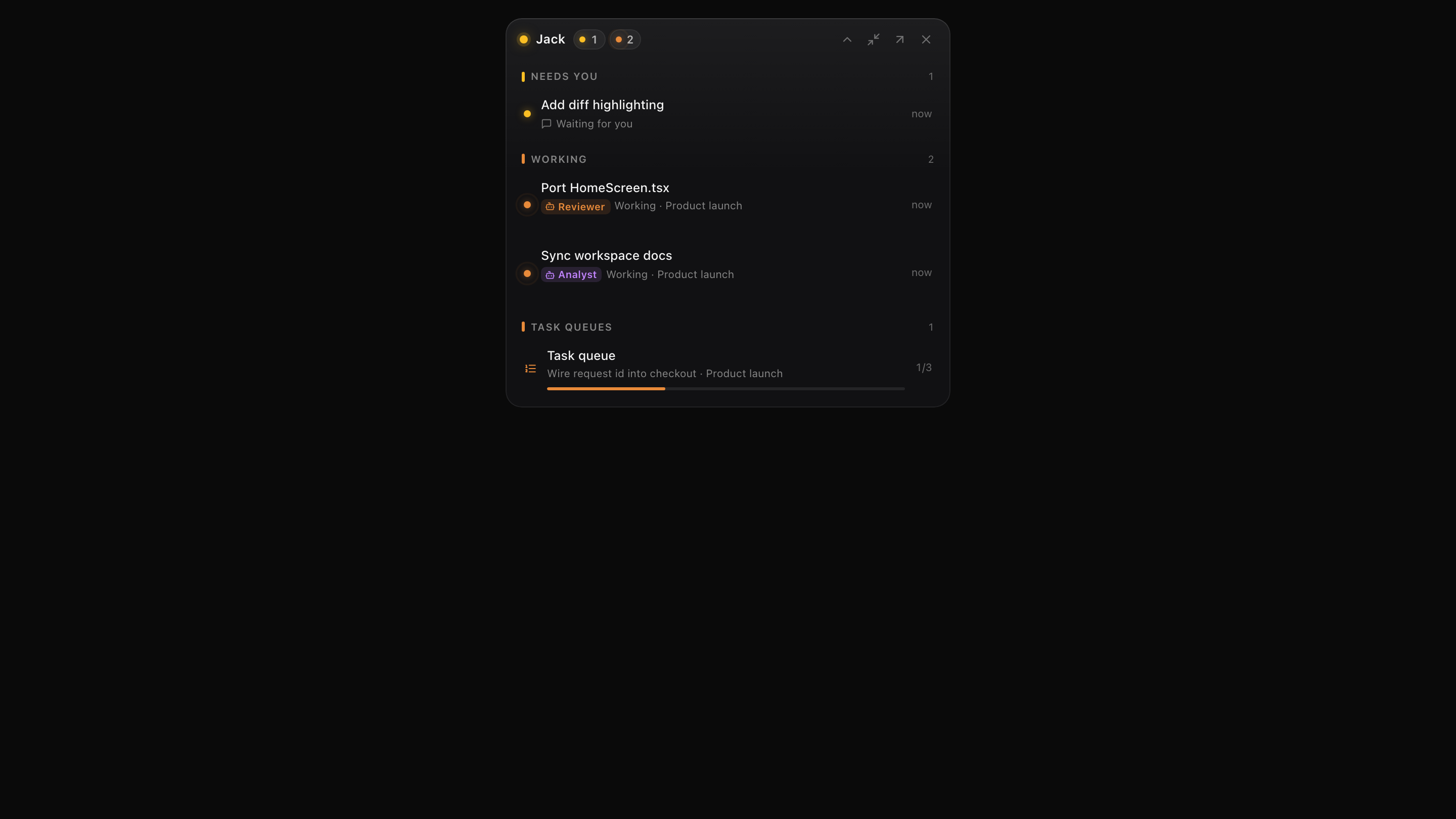
Allow, deny, or always-allow pnpm test for this session, this workspace, or everywhere, across providers. ⌘Y allow, ⌘N deny. No silent timeouts: the agent waits, you decide when you are back. More →
One card per workspace with a health badge, its activities and phase, a status dot per agent role, and un-played task cards. Blocking signals pin to the top. It only aggregates state, so it is instant and works offline.
An always-on-top card with needs-you, working and just-finished, inline Allow and Deny for common tool shapes, and your rate limits. ⌘⌥J shows it, ⌘⌥K shrinks it, ⌘⌥⇥ switches workspace.
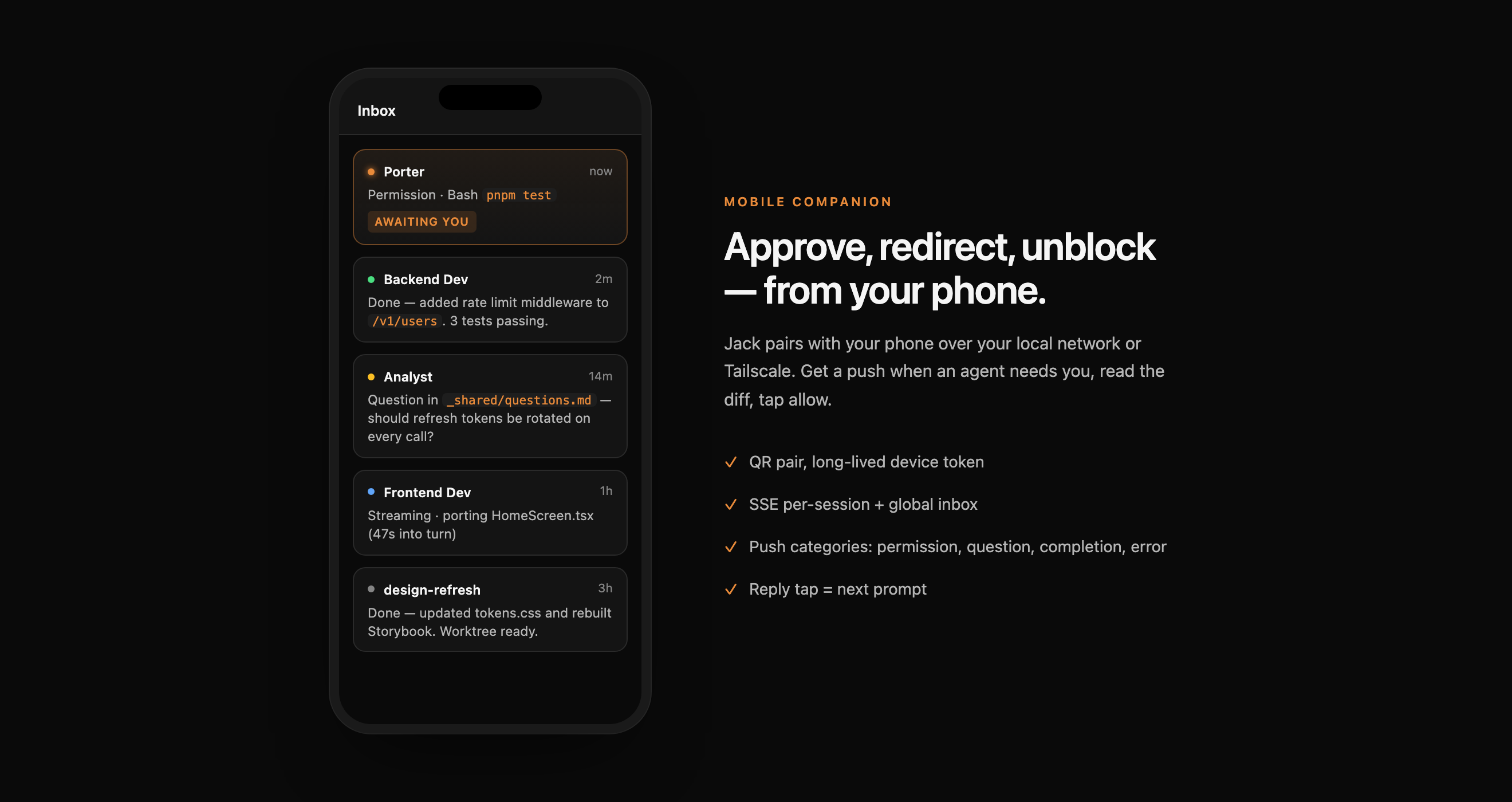
Waiting on you, errors, and things that finished while you were elsewhere, in that order. Marking seen on the phone clears it on the desktop. The broom never sweeps a blocking item. ⌘J cycles what is waiting.
iOS and Android. Full streaming chat with tool cards, permission and question cards resolvable from the notification, workspaces, todos, activities with Play, files and git history, service and container logs, a node terminal. Writes from the phone are separate opt-in grants with preview and confirm.
jackd runs Jack's core on a Linux server in Docker. The desktop attaches it as a second node with its own workspaces and sessions in the same UI, and the phone can pair with it directly. Close the laptop, the agents keep going.
Honest scope. Live lock-screen updates on the phone depend on a relay that is still being rolled out; the in-app HUD works today. Moving a running session between nodes is designed but not exposed yet. Mobile parity with the desktop is a backlog, not a claim.
Cooperation, not orchestration
A backend-dev on Claude writes the API contract to _shared/api/auth.md. A reviewer on Codex reads it, opens the diff, leaves notes. They never share a runtime. Rooms, run plans and the timeline all sit on top of the same plain files, which is why the whole thing still makes sense when you open the repo in a terminal.
├── AGENTS.md                      # who owns what, read by every agent
├── _shared/
│   ├── specs/                     # feature specs, product → dev
│   ├── api/                       # contracts, producer → consumer
│   ├── decisions/                 # numbered ADRs, host-allocated numbers
│   ├── tasks/                     # handoff tasks, closed in place
│   ├── reports/                   # exported room verdicts
│   ├── diary/                     # one file per agent per day
│   └── questions.md               # answer from the timeline, wake the asker
├── apps/
│   ├── api/                       # backend-dev's folder
│   └── web/                       # frontend-dev's folder
└── tests/smoke/                   # Playwright specs exported by the agent browser
AGENTS.md says which agent writes to which folder. Transversal coordinators read everywhere and write only to a whitelist; out-of-bounds writes are refused before they happen.
New artifacts get frontmatter and host-allocated numbers. Violations become an event you can see, never a blocked write. Nothing rewrites your existing files.
A shared checklist for the things only a human can do: decisions, credentials, deploy approvals. Agents add to it only when blocked on you. Promote an item to an Activity in one click.
Open the same repo in plain Claude Code, Codex CLI or vim. Roles, specs, ADRs and tasks still read the same. Jack adds the UX, not the dependency.
Deep dive: how AI coding agents cooperate without an orchestrator →
Common questions
Honest about scope: macOS-first today, single-user today, free today. The roadmap is interesting because it is clear what we do not ship yet.
Jack is a free macOS IDE built for AI coding agents. Claude Code, OpenAI Codex and Google Gemini run in the same workspaces with a real code editor, git review, terminals, services, databases and a browser they can drive. Agents from different vendors deliberate in Rooms, run plans execute unattended, and every tool call passes through you: permission cards on the desktop, a floating HUD, or a push card on your phone. Everything local, no account required for local features, telemetry off by default.
Neither. Jack is an IDE designed around the agent: tabs and split panes, a CodeMirror editor with multi-cursor and go-to-definition, a git history and review tab, terminals and services, all in the same window as the agent sessions. You can still open files in your usual editor, but you no longer have to.
You need at least one to actually run an agent: Jack is the IDE, not the model. Jack itself is free. Some helpers such as AI commit messages and bookmark distillation use a one-shot model call and today require Claude Code.
No. Every local feature works signed out. A free Jack account is optional and adds account-based phone pairing, push delivery and access to beta features. Signing in never uploads your code, and a feature you are not entitled to is simply invisible, never a disabled button with an upsell.
Every agent, whatever its vendor, gets the same host tools over MCP: read and query your databases on a read-only session, read terminal output and container logs, run a command inside a project container, drive an allowlisted browser and export the run as a Playwright test, use test credentials it never sees, wait for a verification email, propose commits and merges for your review, keep a shared todo list, and message agents on other vendors inside a Room.
A Room is a persistent conversation between agents on different vendors, brokered by Jack. You pick a recipe (second opinion, challenge my answer, security check, cross review), bind a Claude session and a Codex session, write a brief and press Start. In the security recipe the two analysts cannot read each other until both have posted, then they challenge each other and you publish a verdict, exportable as a report or an ADR. Rooms are verified on Claude and Codex today; Gemini follows after a parity check.
Yes, through run plans: named queues of steps targeting agent slots, executed by a host-side runner. Steps for different agents run in parallel, a permission prompt pauses the plan and notifies you, and a provider usage limit parks the plan and resumes it when the window resets, surviving app restarts and sleep. Agents can also arm a single self wake-up, with a five-minute floor and a budget that force-stops runaway loops.
Nowhere we control. Sessions run on your machine, talking to the provider you chose. Jack stores its own metadata locally in SQLite under ~/Library/Application Support/jack/. Database passwords, vault secrets and mailbox tokens live in the OS secret store.
The Jack runtime is closed today. The contracts that let providers plug in are open: @ottimis/jack-provider-sdk and @ottimis/jack-chat-core are MIT on npm, and the Provider guide lives at github.com/ottimis/JACK-provider-sdk. Gemini itself ships as a plugin built on that SDK.
The desktop app is macOS only today, Apple Silicon and Intel. A headless Linux node, jackd, runs Jack's core in Docker and pairs with the desktop and the phone; it is an early preview.
Yes, Jack Mobile for iOS and Android. It streams the full chat, shows permission cards and questions, lists workspaces, todos and activities, lets you play a task, read files, diffs and git history, watch services and container logs, and open a terminal on a node. Writes from the phone are separate opt-in grants with a preview and confirm step.
Opt-in only. Sentry for crashes, PostHog for product analytics, both gated by a consent dialog at first boot. Anonymous device ID, no user identity, no project paths, no prompt content, no workspace or container names. Whitelisted event names, off by default.
Free for solo. Team layer for teams.
The split is clean: anything that runs on one developer's machine stays free. Anything that involves more than one person is the future paid layer, built on the same primitives, opt-in, and invisible until you have it.
Free · forever · no account · uses your provider subscriptions
Per-seat · early access
The team layer is built on top of the same git, Rooms and workspace primitives. No data leaves your box unless you choose.
Jack is free, local, and reuses the AI subscriptions you already pay for. Every keystroke stays on your Mac.